



Digital Logbook for Student Pilots: Backup, Sync and eGCA Export
A digital logbook is safer than a paper one because every flight and simulator entry is stored on a server, not on one physical book that rain, fire, spills or a lost bag can destroy. You log from your phone after landing, export to PDF or Excel when needed, and keep the record for life. For student pilots in Delhi and across India, that is a real difference.
Rian Air builds this into its RAPT™ platform, which runs on web, Android and iOS and includes a digital pilot logbook alongside DGCA academics and a question bank of 20,000+ questions. This guide shows why paper quietly fails, how the phone workflow works, how to export for eGCA, and what to check before you commit to any logbook tool.
Digital Logbook vs Paper Logbook at a Glance
Most student pilots start with a paper book because the instructor hands one over. It works until something goes wrong, and by then the hours are gone. The table below sets the two side by side, using how RAPT handles each point.
Point | Paper logbook | Digital logbook (RAPT) |
|---|---|---|
Backup | None unless you photocopy pages by hand | Stored on the server; backups are never deleted |
Damage risk | Rain, fire, spillage, wear | Does not depend on any physical copy |
Carrying it | A bulky book in your bag | Your phone is enough |
Logging after landing | Handwritten, often later | Sync hours from a mobile phone after landing |
Export | Photocopy or scan | PDF or Excel download; Excel can be uploaded directly with eGCA |
Trust and transparency | Entries can be edited or backdated by hand | Every log carries a time stamp; faking logs is not possible |
New phone or iPad | Not applicable | Your log details stay with you for life |
Other authorities | Re-copy by hand | Convertible to EASA, GCAA, DGCA and FAA formats today, with more countries coming |
How Do Paper Logbooks Fail Student Pilots?
Paper logbooks fail because they exist as a single physical copy. Rain, fire, a spilled drink or a lost bag can destroy years of flying records, and a pilot who has no backup cannot rebuild them. Handwritten entries also invite arithmetic and carry-forward errors that surface later, during licensing checks.

Think about where a logbook actually lives. It goes from a hostel room in Thrissur to a flight school apron, into a bag, onto a bus, and back. Monsoon rain, a leaking water bottle or a cup of chai is all it takes. Paper pages are also bulky once they fill up.
The loss problem: no backup, no proof
Flight hours and landings are the entries that matter most for licensing. If the book is lost, you have no second record of them. Instructors and flight schools hold their own records, but chasing them months later, possibly across countries, is slow and stressful. A server copy removes that risk entirely.
The error problem: small slips that cost time
A wrong total carried over to the next page can sit unnoticed for months. Smudged ink, a missed landing or a swapped date creates questions when your hours are checked. The Directorate General of Civil Aviation's own guidance stresses that logbook details such as date, time, aircraft type, departure and arrival points, duration and role must be entered precisely and correctly, because they are used to assess the pilot's experience.
Is a paper backup still fine?
Yes. A paper copy kept at home is a sensible extra. What changes is that it no longer has to travel with you, and it is no longer your only record. Paper will not fail you if it is the backup; it fails when it is the only copy.
How Do You Sync Flight Hours From a Phone After Landing?
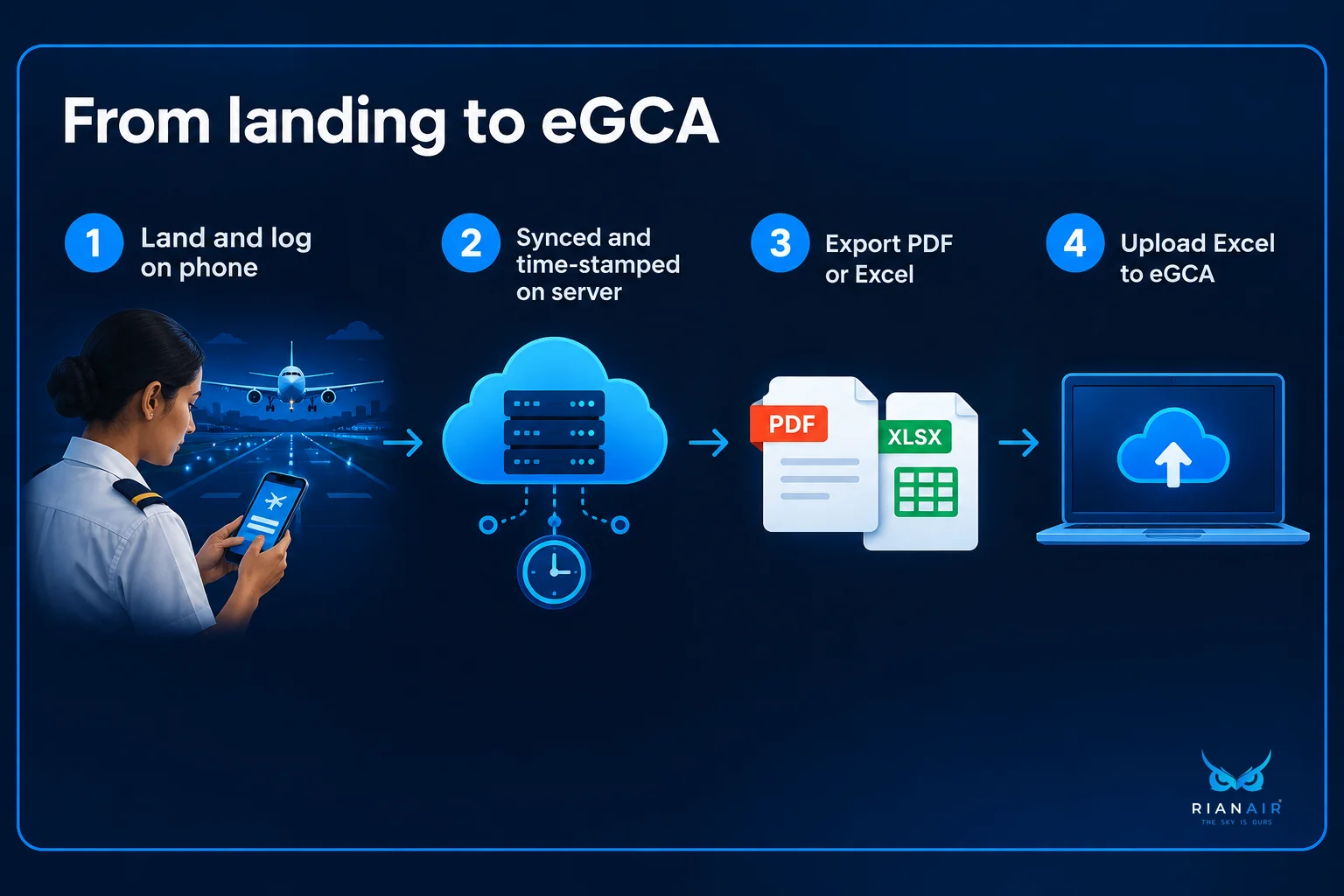
Log into the RAPT app on your phone after landing, enter the flight or simulator details, and save. The entry syncs to the server, so you need no bulky device or paper book at the airfield. Each entry gets a time stamp, which keeps the record transparent.
Here is a simple routine that works for a student pilot at a flying school in India:
Land and shut down. Finish your post-flight tasks first; do not log while distracted.
Open the RAPT app on your phone. You do not need a tablet or a laptop.
Enter the flight. Record flight hours and landings, the entries RAPT validates, along with the other details your flying school expects.
Save and let it sync. The record is now on the server with a time stamp.
Add simulator sessions the same way. Simulator time is logged separately from actual flight time.
Why time stamps matter to regulators and employers
Every log in RAPT carries a time stamp, so faking logs is not possible. That is deliberate. It creates transparency between the pilot and the civil aviation authority of whichever country the logbook is used in. It also helps employers such as airlines, charter operators, air ambulance services and flight schools trust what they read.
What eGCA expects from you
The DGCA's circular on licensing through eGCA says registered candidates shall log their flying details regularly in the e-logbook available in their eGCA profile, certified or approved by authorised personnel. So regular logging is the habit to build. The Press Information Bureau has also described efforts to transfer pilots' flying records directly into eGCA to cut manual entry. A tidy phone-first log fits that direction.
Delays in flight training also stretch your logging timeline. Our student diary on flight training delays due to aircraft availability shows why keeping a clean, continuous record matters when schedules shift.
How Do You Export a Logbook to PDF or Excel for eGCA Upload?
Open your logbook in RAPT and download it as a PDF for a readable copy or as an Excel file for eGCA. Our Excel export can be uploaded directly with eGCA. Check every entry before you upload, because the file only carries what you logged.
Use each format for what it does best:
PDF: a clean, readable copy to show a flight school, an examiner, an airline recruiter or your parents.
Excel: the file to upload to eGCA, and also handy for your own totals and checks.
A short pre-upload check
Scan the dates for gaps or duplicates.
Check that landings match the flights you flew.
Confirm that simulator hours are not mixed into actual flight hours. A CPL needs 200 actual flight hours.
Make sure your flight school's approvals are in place, since eGCA entries are certified or approved by authorised personnel.
Download the PDF too and keep it with your other documents.
We state only what we have confirmed: the Excel export can be uploaded directly with eGCA. Your flight training organisation and DGCA remain the authorities on what they accept for any licence application.
What Should You Look For When Comparing Digital Logbook Tools?
Choose a digital logbook that backs up to a server, time-stamps every entry, syncs from a phone, exports to PDF and Excel, and converts between authority formats such as DGCA, EASA, FAA and GCAA. It should also keep your data for life, even when you change phones.

Many apps online are built for ships, factories or medical colleges, not for pilots. A student pilot needs something made for flight and simulator hours. Use this checklist.
What to look for
Server backup: your data must not live only on your phone. Ask whether backups are ever deleted.
Time stamps on every log: this protects you and gives an authority or employer confidence.
Phone-first entry: you should be able to log after landing without carrying extra devices.
Flight and simulator hours: both should be supported, and kept distinct.
PDF and Excel export: check that the Excel file suits eGCA upload.
Multi-authority conversion: useful if you may train or work abroad.
Lifetime access: your log should survive a new phone, a new iPad and a new employer.
Family visibility: parents funding training value a parent dashboard for progress tracking.
Red flags
Data stored only on the device, with no sync.
No time stamps, so entries can be quietly edited.
No export, which locks your hours inside one app.
Tools built for other industries that do not separate flight and simulator time.
A system that ties your records to one employer instead of to you.
Where our service areas fit in
Our students train and study in Delhi, Mumbai and Thrissur, and many go on to fly in India or abroad. A logbook that moves with you matters more than one tied to a single school. If you are still planning ground classes, our Delhi ground training roadmap explains what comes first.
One Digital Logbook From Enrollment to Retirement
We describe RAPT as forever with you. It starts the day you fill in your enrollment form and follows you through clearing your DGCA exams, logging flight and simulator hours, and clearing your ATPL exams, with more coming. By the time you have tens of thousands of hours at retirement, the same record is still yours.
Your logs stay with you even if you upgrade your phone or iPad. Log in on the new device and your history is there, because it lives on the server, not on the handset.
Coming soon: roster sync and ATPL planning
We are building a feature that lets a first officer sync their airline roster. RAPT will then help plan ATPL exams and schedule study time around flying duties. The aim is to stop pilots from cramming in the final days before an exam, which is when most attempts go wrong. This is not live yet. If ATPL is on your horizon, read our guide to ATPL preparation in India now.
Take the next step
Try the free RAPT demo to see how the platform feels on your phone. If you want help planning your training pathway, start your pilot training enquiry with our team. For short explainers and student updates, you can follow us on Instagram and subscribe on YouTube.
Digital Logbook FAQs
Do I still need a paper logbook while I train in India?
Ask your flight training organisation what it requires, because school and DGCA procedures decide that. A digital logbook gives you a complete, backed-up record of your own. If you want a paper copy, keep it at home as a backup, not in your flight bag.
What happens to my logbook if I lose or change my phone?
Nothing is lost. Your log details are stored on the server, not on the handset. Install the app on your new phone or iPad, sign in, and your history appears. That is why we say RAPT stays with you for life, whichever device you use.
Can my parents follow my progress?
RAPT includes a parent dashboard for tracking training progress, which families funding pilot training often find reassuring. The exact details shown depend on your plan, so ask our team what your parents will see when you enrol. Sharing a PDF export is another simple option.
Do simulator hours go in the same logbook as flight hours?
Yes, RAPT lets you log simulator hours as well as flight hours, but they are recorded separately. This matters because a CPL requires 200 actual flight hours, and simulator time is not the same as actual flying. Keeping them distinct avoids confusion at audit time.
Will my logbook work if I train abroad in Tunisia, Malta or New Zealand?
RAPT logs can be converted to EASA, GCAA, DGCA and FAA formats as of now, with more countries to be added. That helps if you train abroad and then return home. Remember that clearing your DGCA exams before leaving is advisable, since skipping them can raise conversion costs.
Is a digital logbook useful after I get my CPL?
Yes. Airlines, charter companies and air ambulance operators all want clear records of your hours. A logbook that started in training keeps going through your ATPL exams and your first job. Our guide on ground training covers the early stage only, so plan the logbook as a lifelong habit.
Can I edit or backdate entries to fix a mistake?
Every log carries a time stamp, so faking or backdating logs is not possible in RAPT. That protects your credibility with the aviation authority and with employers. If you spot an honest error, check the correction process with our team and your flight school before you rely on the entry.
Does a digital logbook replace my instructor's approval?
No. A digital logbook organises and protects your record, but your flight school and DGCA procedures still apply. Entries on eGCA are certified or approved by authorised personnel. Treat the app as the safe, tidy home for your data, and keep your approvals in order.
In RAPT, the student enters the time for a solo flight, and the instructor approves the entries for a dual flight. The logbook runs on the honour system and is not meant to be cheated. Falsified entries are highlighted, along with the time stamp of any entry edited later.
A Rian Air representative monitors each and every logbook entry before it is uploaded to the eGCA portal, to ensure there are no issues during licence issue by the DGCA or during licence conversion. We encourage students to fill in the logbook immediately after the flight, after the post-flight briefing by the instructor.
Which details should every logbook entry include?
Each entry should record the date, time, aircraft type, departure and arrival locations, flight duration and your role as pilot or co-pilot. Add landings too, since flight hours and landings are the entries RAPT validates. Complete entries save you from awkward questions later.
What if an airline or school insists on a paper logbook?
Download your logbook as a PDF and print it. You get a clean paper copy generated from your server record, so the paper never becomes the single point of failure. If someone prefers Excel, you can export that format as well.
How can I try RAPT before I commit?
Sign up for the free demo to check where you stand. It is a quick way to see how the platform feels on your phone before you decide on a course. You can create your RAPT demo account in a few minutes and take a progress check.
Recommended Resources
Start Your Pilot Journey Try Our Free RAPT Demo Now Home Rian Air